Dots: A Playful Color Font for Personalized Designs
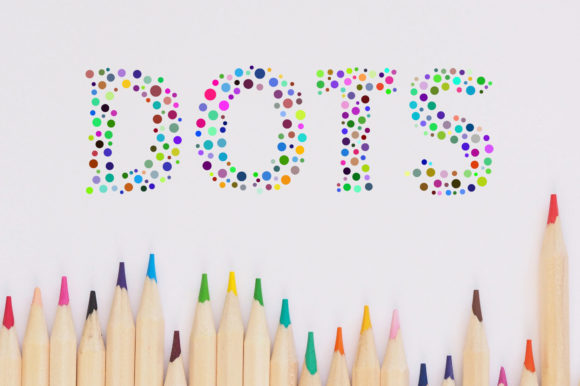
Imagine a typeface that feels like it was crafted by hand, filled with color, and ready to bring a unique personality to your next project. Dots is exactly that—a superb dotted letters color font designed for creators who want to add a personalized, textured look to their work. This premium font stands out with its charming dotted construction, making it an excellent choice for designs that need a touch of whimsy and originality.
What Makes This Typeface Special?
Dots is not your average serif or sans serif font. It's a modern display font where each letter is formed from carefully placed dots, creating a visually engaging pattern. As an OpenType-SVG color font, it arrives with built-in color, so you don't have to manually add fills or effects. This makes it a powerful creative font for digital and print projects where visual impact is key. It’s perfect for anyone looking for a standout font download that offers something beyond traditional script or handwritten fonts.
Creative Projects That Shine with Dotted Typography
The unique character of this typeface makes it incredibly versatile for various design applications. Here are a few practical use cases where it can elevate your work:
- Brand Identity & Logo Design: Use it to craft memorable logos, wordmarks, or brand elements for businesses that want to appear friendly, creative, and approachable. It’s ideal for bakeries, craft shops, children’s brands, or boutique studios.
- Packaging Design: The textured, dotted look adds a tactile quality to product labels, boxes, and tags, making items feel handcrafted and special.
- Social Media Graphics: Create eye-catching Instagram stories, Facebook posts, or Pinterest pins that stop the scroll. Its playful nature works well for quotes, announcements, and sale promotions.
- Poster & Editorial Design: Add a headline that pops in magazine layouts, event posters, or book covers where a modern typography touch is desired.
- Invitations & Merchandise: From birthday invitations to tote bags and t-shirts, this font brings a personalized charm to physical goods.
Tips for Choosing and Using This Font
To get the most out of your design assets, consider these practical tips. First, always test the font in your specific design software. As a color font (Opentype-SVG), it is compatible with Adobe Photoshop, Illustrator, and other advanced programs like Silhouette and Inkscape. Remember that the standard OTF and TTF files are not compatible with Cricut, so check our Ultimate Font Guide for detailed usage instructions.
When pairing fonts, balance is key. Dots works beautifully as a headline or display font. Pair it with a clean, simple sans serif or serif font for body text to ensure readability and create a harmonious layout. Think about the mood of your project—its dotted style conveys fun and creativity, so it’s best suited for projects that embrace that energy. Always review the license to ensure it covers your intended use, whether for personal projects or commercial client work.
Selecting the right typeface is a fundamental step in achieving visual consistency and strong brand recognition. A well-chosen font like Dots does more than just display words; it communicates personality, sets a tone, and helps make designs look polished and professional. By integrating this creative asset thoughtfully, you can enhance the overall aesthetic of your work and deliver a more engaging experience to your audience.
Ultimately, the best font choices are those that align with your project’s story and goals. Dots offers a distinct and playful avenue for expression, helping you create designs that feel both personal and professionally crafted. Explore its potential to see how it can transform your next creative endeavor.